Australia’s First Integrated Online Cutting Optimiser for Cut-to-Size Steel
Smarter custom steel cutting with the online optimiser
Edcon Steel’s online cutting optimiser is an innovative step forward for cut-to-size steel ordering in Australia, giving customers a faster, easier way to build cutting lists online.
Save time and take the guesswork out of ordering cut-to-size steel.
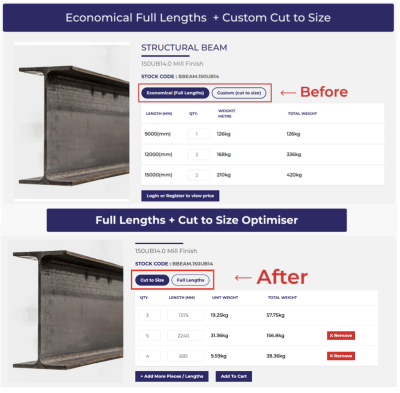
What is Edcon Steel’s online cutting optimiser?
The online cutting optimiser is part of Edcon Steel’s Cut to Size ordering system for eligible 1D, length-based products.
On eligible product pages, you can enter the steel lengths and quantities you need, then let the system calculate how those cuts can be supplied from available stock lengths. This helps reduce manual calculations, improve ordering accuracy and make better use of material before you add your order to cart.
It is designed for customers who need more than one simple cut, including builders, fabricators, workshops, project managers and anyone ordering from a cutting list.
The goal is simple: enter your cuts, let the system work out the stock lengths, and order online with more confidence.
For now, the optimiser is available for eligible length-based products only. Edcon Steel is already working on the next stage of the system, with support for 2D or flat sheet products planned for a future release.
Built for real cutting lists
If you have ever tried to work out how many full lengths you need to cover a list of cuts, you know the process can take time.
You need to calculate the lengths, allow for waste, check the available stock size, adjust quantities and make sure the order still makes sense commercially. On larger jobs, that can quickly become frustrating, especially when the cutting list changes.
Edcon Steel’s optimiser helps take that manual work out of the process.
You can enter your required cut lengths and quantities online, then the system works out which stock lengths to use to fulfil your order. That means less time estimating, less back-and-forth, and a clearer way to order the steel you need.
If you are working from a cutting list, choose the steel product you need and enter your required lengths through the Cut to Size option.
How the cut to size optimiser works
01
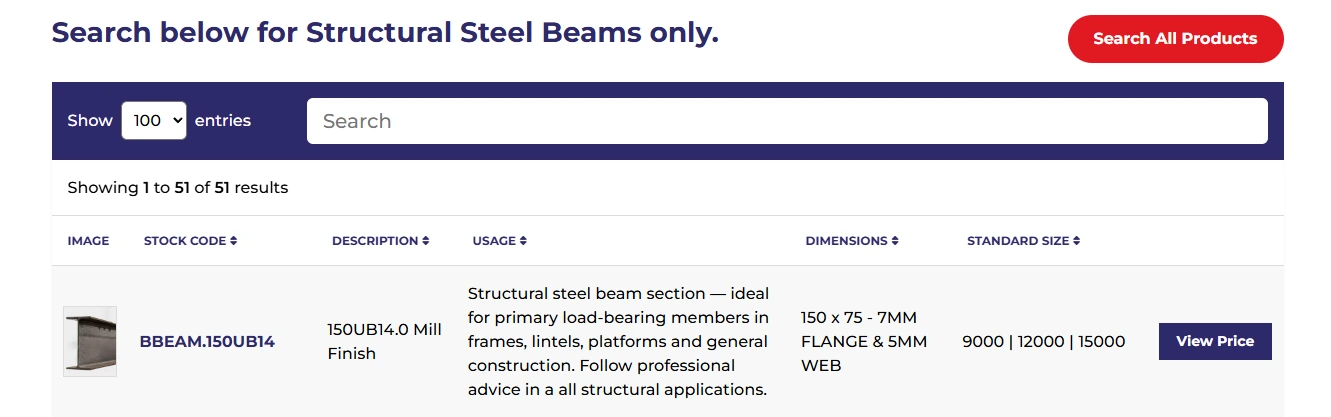
Select your steel product
Start by choosing an eligible steel or metal product from the online store.
02
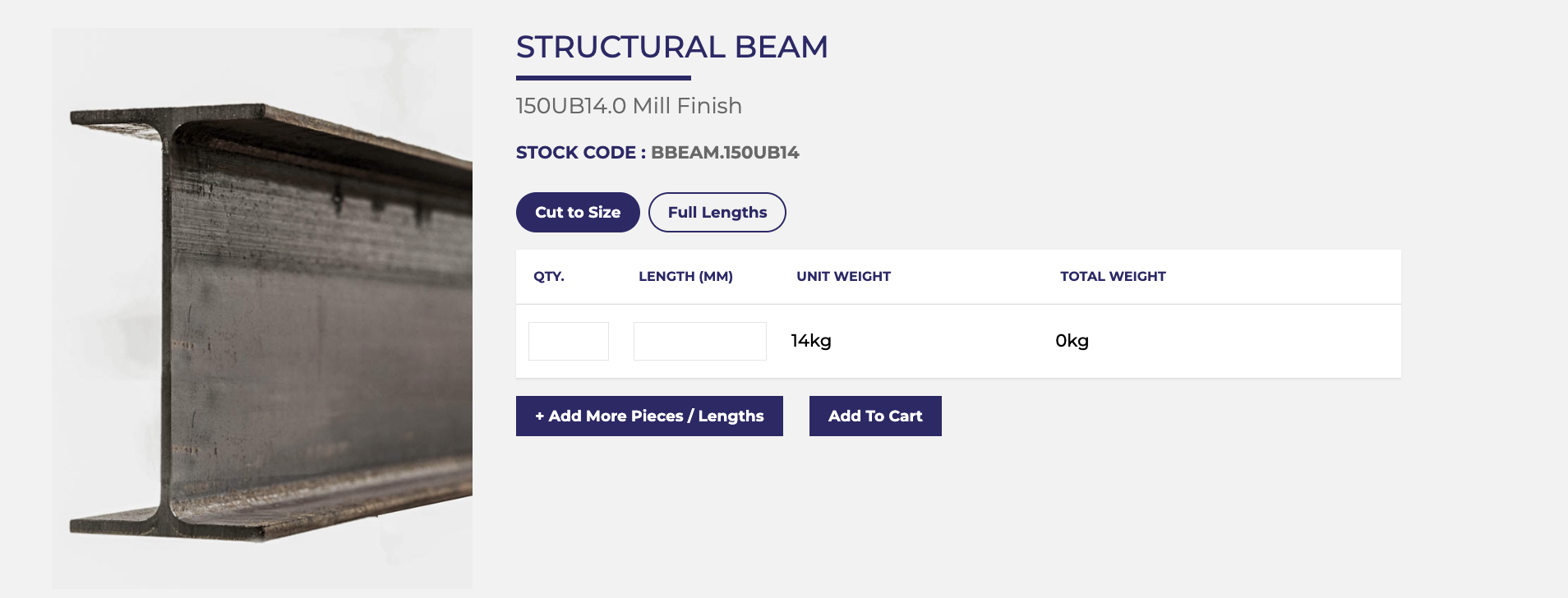
Choose the Cut to Size option
On the product page, select the Cut to Size tab.
03
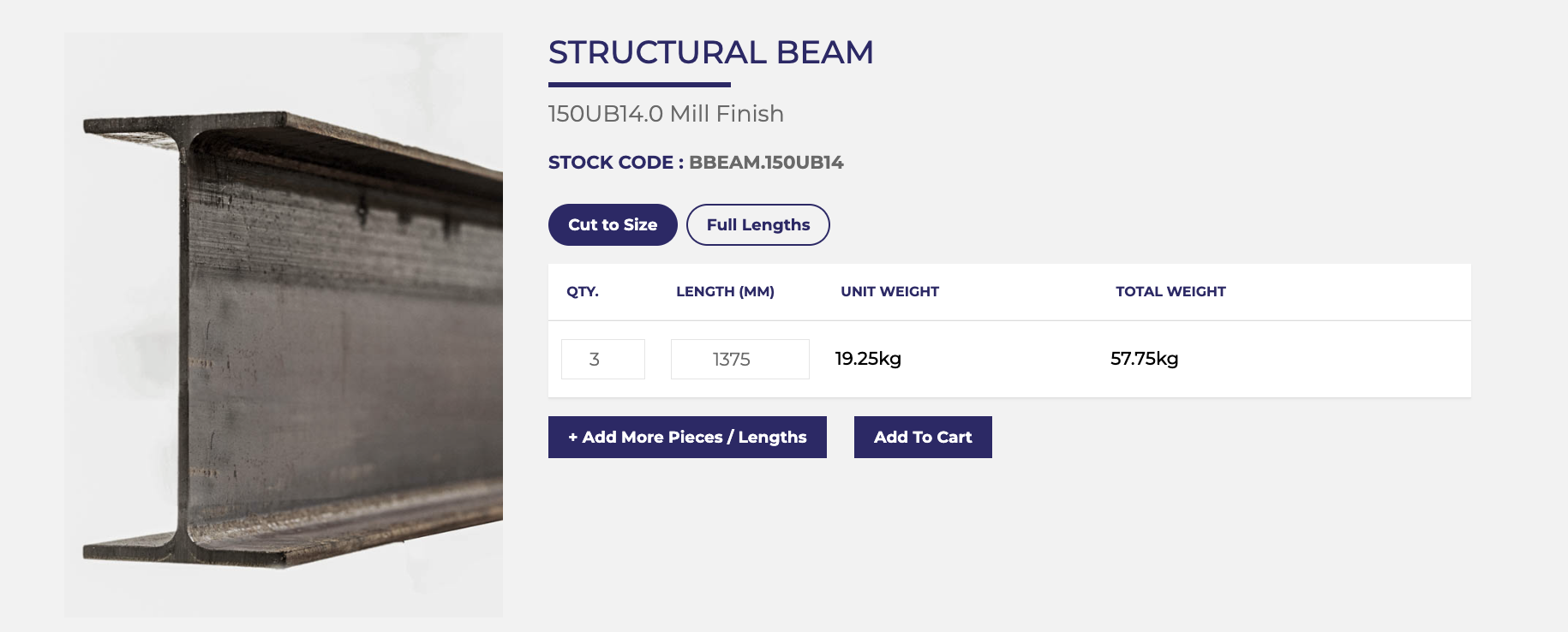
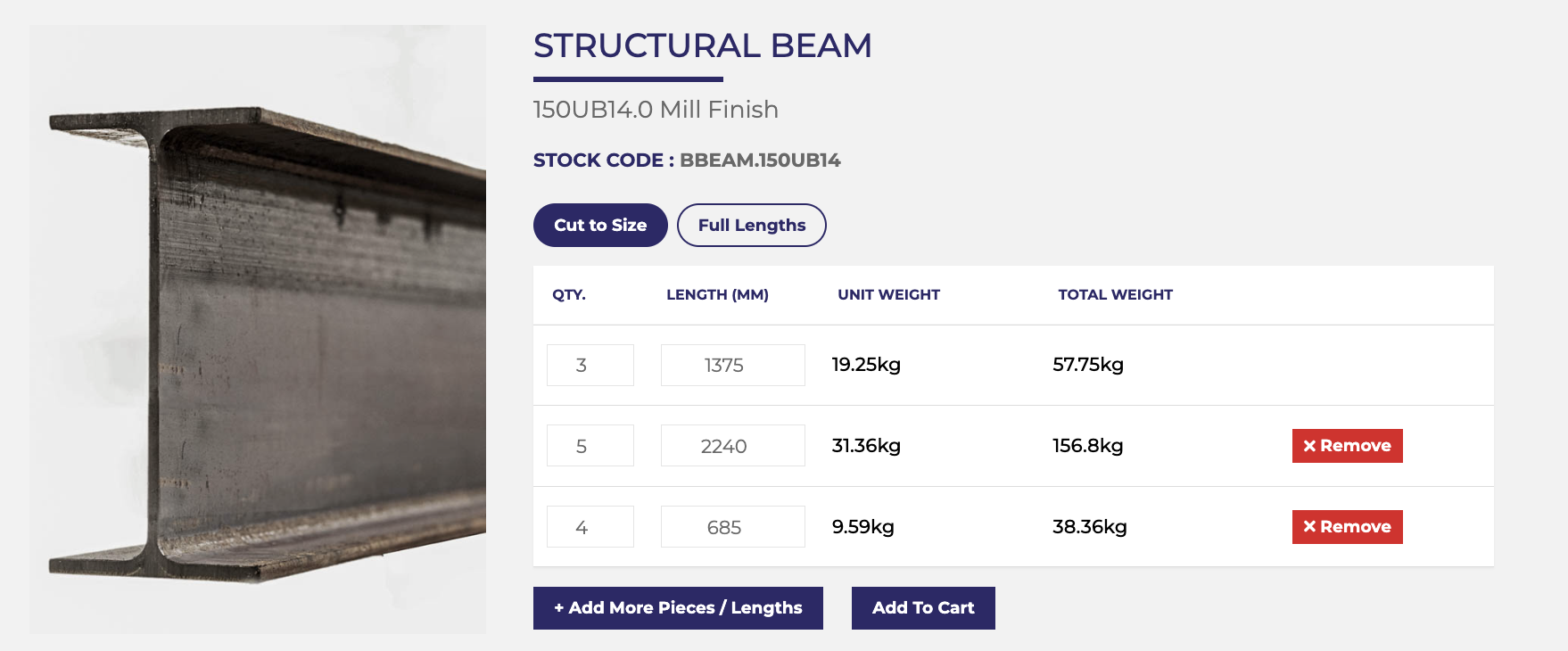
Enter your cut lengths and quantities
Enter the length and quantity for each item you need. You can add multiple lines, making it easy to work from a cutting list or project schedule. Before adding your items to the cart, check that all lengths and quantities are correct, as they cannot be edited once added to the cart.
04
Let the system calculate the stock lengths
The optimiser works out which stock lengths can be used to supply your cuts in the most economical way available through the online system.
05
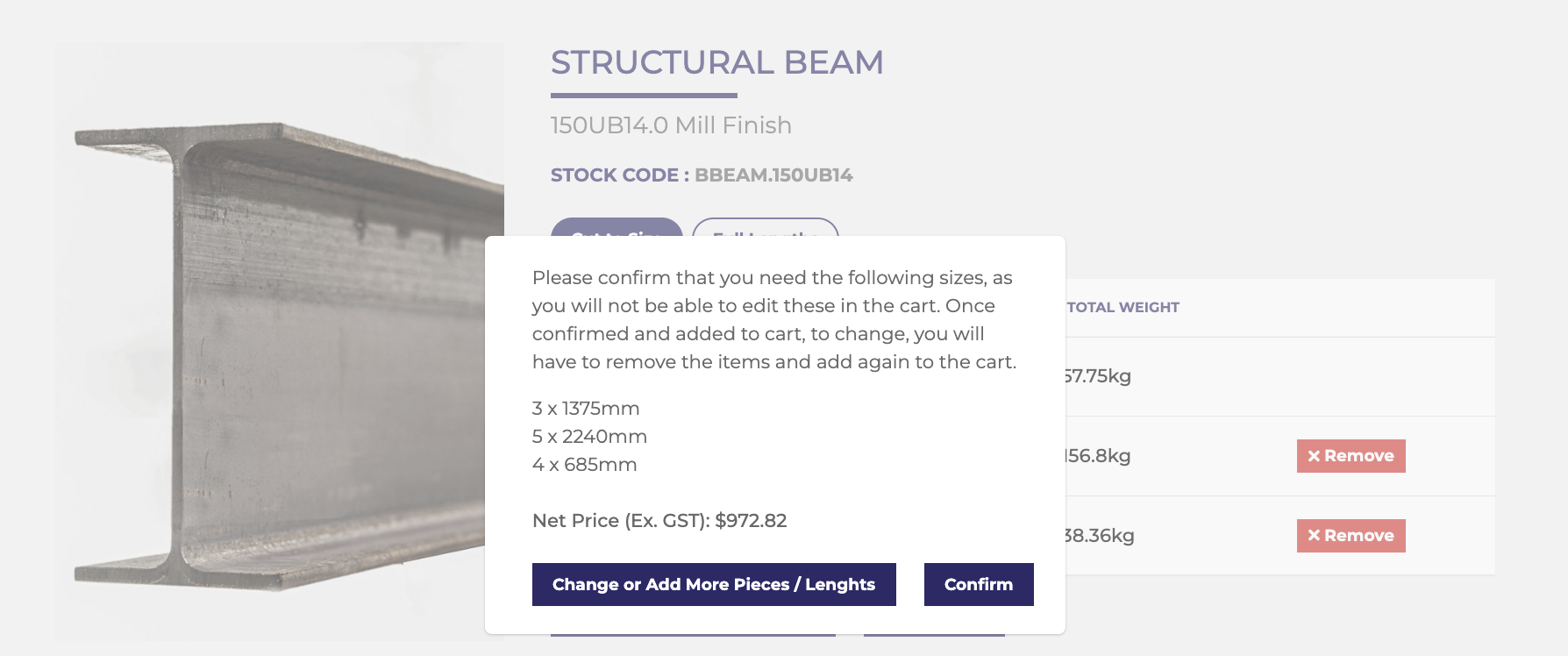
Add to cart and confirm your cut list
Once your cutting list is complete, click Add To Cart. Review the cut lengths, quantities and price shown in the confirmation window, then select Confirm to add the order to your cart.
Important note:
Please check all cut lengths and quantities before confirming your order. Changes after submission may require you to remove the items and re-enter your cutting details.
For help with the full online ordering process, visit the How to Order Steel Online guide.
Why use the online cutting optimiser?
Save time on manual calculations
Instead of calculating stock lengths yourself, the system does the stock-length calculation for you. This is especially useful when you have multiple pieces, repeated cuts or a full cutting schedule to work through.
Reduce unnecessary waste
Better use of available stock lengths can help reduce unnecessary leftovers and improve material efficiency. That means a cleaner, more practical way to order cut-to-size steel online.
Order multiple cuts more easily
The old process worked best for simple, single-length entries. The updated Cut to Size system allows you to enter a full list of lengths and quantities, making it much easier to manage project-based orders.
Improve ordering accuracy
When your cut list is entered clearly in one place, it is easier to review your order before submitting it. This helps reduce confusion and gives both you and the Edcon Steel team a clearer starting point.
Get better value from available stock lengths
The optimiser helps determine a more economical way to supply your cuts from available stock lengths. It is not about over-ordering “just in case.” It is about helping you order what you need with less manual working out.
Ideal for builders, fabricators and project orders
The online cutting optimiser is especially useful when you are working with more than one cut length or preparing steel for a larger job.
Trade customers can also use their online account when ordering steel products, entering purchase order details or submitting suitable orders for quote review.
It can help with:
Builders working from site requirements
Fabricators preparing workshop cut lists
Commercial and residential project orders
Trade customers ordering repeat or varied lengths
Customers working from drawings, schedules or bills of materials
DIY customers who want cut-to-size steel without manual calculations
Whether you are ordering for fabrication, repairs, site work, maintenance or a home project, the optimiser gives you a clearer way to enter the cuts you need.
For more detail on Edcon Steel’s custom cutting service, visit the Custom-Cut Metal and Steel page before placing your order.
Cut to size or full lengths - what should you choose?
Not every order needs cutting, so Edcon Steel gives you both options.
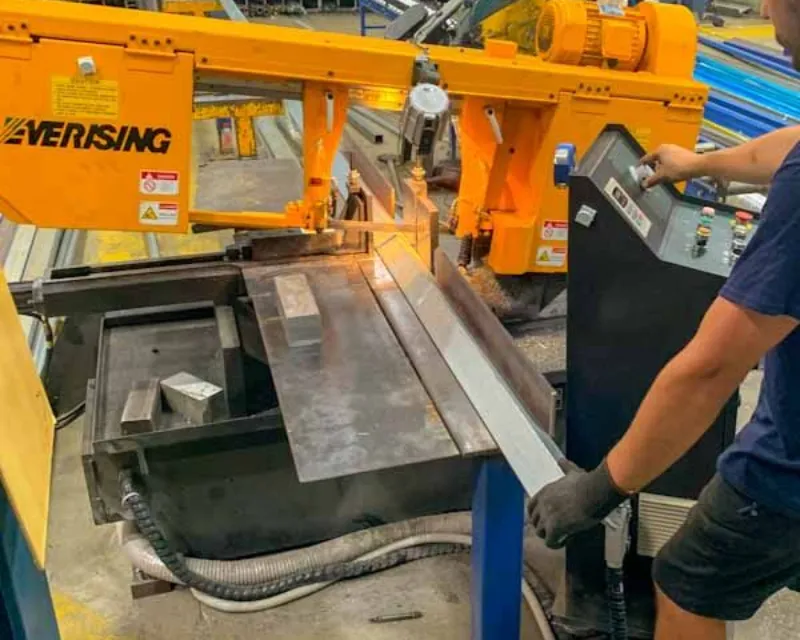
Choose Cut to Size when you want Edcon Steel to cut eligible products to specific lengths. This is where the online optimiser can help calculate which stock lengths can be used to supply your cut list.
Choose Full Lengths when you want to order standard stock lengths without cutting. This option was previously called Economical Full Lengths and remains available for customers who prefer to order steel in standard lengths.
Either way, you can continue to order online through Edcon Steel’s website.
If you are unsure how the online ordering steps work, the How to Order Steel Online guide explains the full process from product selection through to checkout.
Online convenience, backed by Edcon Steel know-how
The optimiser makes online ordering easier, but you are still ordering through Edcon Steel’s experienced team and stocked supply network.
For larger or more complex orders, you can still submit your cart for quote review. Trade customers can continue to use their account login, include purchase order details and manage steel ordering online.
That means you get the convenience of a smarter online ordering system, with the support of a steel supplier that understands real jobs, real materials and real cutting requirements.
Edcon Steel already positions itself around custom-cut ordering, 24/7 online access and steel delivered to site or door, so this page should feel like a natural extension of that promise: practical steel ordering, made easier.
Customers who need steel delivered can review Edcon Steel’s delivery information before confirming their order.
Ready to order cut-to-size steel online?
Enter your cut lengths, add your quantities and let Edcon Steel’s online optimiser work out the stock lengths for your order.
Less manual calculation. Better use of available material. A simpler way to order cut-to-size steel online.
To begin, browse Edcon Steel’s steel products online and select Cut to Size on eligible product pages.
FAQs
Can I order steel cut to my own measurements online?
Yes, Edcon Steel allows customers to order cut-to-size steel online on eligible product pages. You can enter the lengths and quantities you need using the Cut to Size option, then the online cutting optimiser works out how those cuts can be supplied from available stock lengths. This is useful if you already have measurements from a plan, cutting list or job schedule.
How do I work out how many lengths of steel I need?
With Edcon Steel’s online cutting optimiser, you do not need to manually calculate how many stock lengths are required for eligible cut-to-size orders. You enter the cut pieces you need, including multiple lengths and quantities, and the system works out which available stock lengths can be used to supply them. This helps reduce guesswork when ordering steel online.
Can I upload or enter a cutting list for steel?
You can enter a cutting list online by adding multiple cut lengths and quantities through the Cut to Size option on eligible products. This is helpful for builders, fabricators and workshops working from project schedules, drawings or bills of materials. For larger orders, the cart can still be submitted for quote review where needed.
What is the best way to order multiple steel cuts online?
The best way is to choose an eligible product, select Cut to Size, then enter each required length and quantity into the online cutting optimiser. The system calculates how your steel cuts can be supplied from available stock lengths, which can make ordering multiple cuts clearer and more efficient. Standard full lengths are still available if you do not need cutting.
Can I order steel cut to size without wasting full lengths?
The online cutting optimiser helps make better use of available stock lengths by calculating how your required cuts can be supplied. This may reduce unnecessary leftover material compared with manually estimating quantities or ordering extra full lengths just in case. The final result depends on the product, available stock lengths and the cut sizes entered.
Steel in Action: Projects & Know-How
23 September 2026 / Edcon Team
Vale Jim Frecklington: Royal Coach Builder and a True Gentleman
<span style="font-weight: 400;">Edcon Steel remembers long-time customer and friend Jim Frecklington OAM MVO, who recently passed away after a long battle with cancer. Jim was an extraordinary man, whose royal coaches made their way from a workshop in Sydney to some of the world’s great ceremonial occasions. Jim was a wonderful character and, quite simply, one of those people you feel fortunate to have known. </span>
Read More
17 June 2026 / Edcon Team
David’s Steel and Metal Creations
Long-time Edcon Steel customer and full-time farmer, Justin Press, has carved out a unique niche restoring antique wood-fired stoves to better-than-new condition.
Read More
15 September 2026 / Edcon Team
Steel Tube: RHS vs CHS vs SHS
<span style="font-weight: 400;">Steel tube are a practical choice for everything from building frames to furniture and architectural work. Here, we explore the key considerations when deciding between RHS, CHS, and RHS.</span>
Read More
22 September 2026 / Edcon Team
Does 316 Stainless Steel Rust? 304 vs 316
Can 316 stainless steel rust? Explore marine-grade stainless steel, corrosion risks, strength, cost, and how to choose the right grade.
Read More
Ready to Get Steel Your Way?
Store locations

Brookvale
Learn More
Revesby
Learn More
Blacktown
Learn More
Bathurst
Learn More
Orange
Learn More
Brookvale Head Office
Learn MoreLeading brands